Austin Video Solutions · Transparent Pricing · South Austin, TX
VHS & Tape Digitization Pricing in Austin
Published rates for standard tape transfers, film scanning, photo digitization, DVD transfers and audio digitization. Custom video editing and Blu-ray authoring are quoted for your project. We confirm the scope and price before work begins.
Every project is handled in a private appointment-only South Austin studio by one person, start to finish. Whether you need a simple MP4 for family viewing, an editable ProRes master, a lossless archival file, a DVD, or a finished edited video, the sections below explain the cost, specs, and practical guidance clearly.
Quick Pricing Overview
The transfer rates below cover the stated transfer service. Custom production is quoted separately. Storage media is billed separately — bring your own blank compatible drive at no additional cost, or we will source one and add the actual retail cost to your invoice.
| Service | Price | Best For | File Size |
|---|---|---|---|
| Tape to MP4 | $25 / started 2-hr block | Viewing, sharing, Smart TV playback | ~10 GB/hr |
| Tape to ProRes | $25 / started 2-hr block | Editing, color grading, archival masters | ~20 GB/hr |
| Tape to Lossless | $52.50 / started 2-hr block | Maximum-fidelity archival preservation | ~96 GB/hr |
| Tape to DVD (Standard) | $17.99 / tape | TV playback, simple archiving | N/A |
| Tape to DVD (Custom Menu) | $22.99 / tape | Gifts, presentations, scene selection | N/A |
| 8mm / Super 8 Film Scanning | $0.49 / foot | Film preservation, documentary projects | Varies |
| Photo / Slide / Negative Scan | $0.49 / image | Family photos, restoration, reprints | Varies |
| Audio Cassette Digitization | From $39.99 / cassette | Music, interviews, personal recordings | Varies |
| Video Editing | $85 / hour | Memorials, highlights, business content | Varies |
| Custom Blu-ray Authoring | Project quote | Custom menus, animated scene selectors and authored masters | As quoted |
MP4, ProRes and Lossless transfers use started 2-hour blocks. At the $25 MP4 or ProRes rate, a 4-hour tape is $50 and a 6-hour tape is $75. DVD transfer prices include up to 2 hours per tape; longer DVD projects are confirmed before work begins. Custom Blu-ray authoring has its own scope, schedule and quote.
Tape to MP4 — Delivered as 1440×1080 MP4 Files
The Standard Choice for Viewing & Sharing
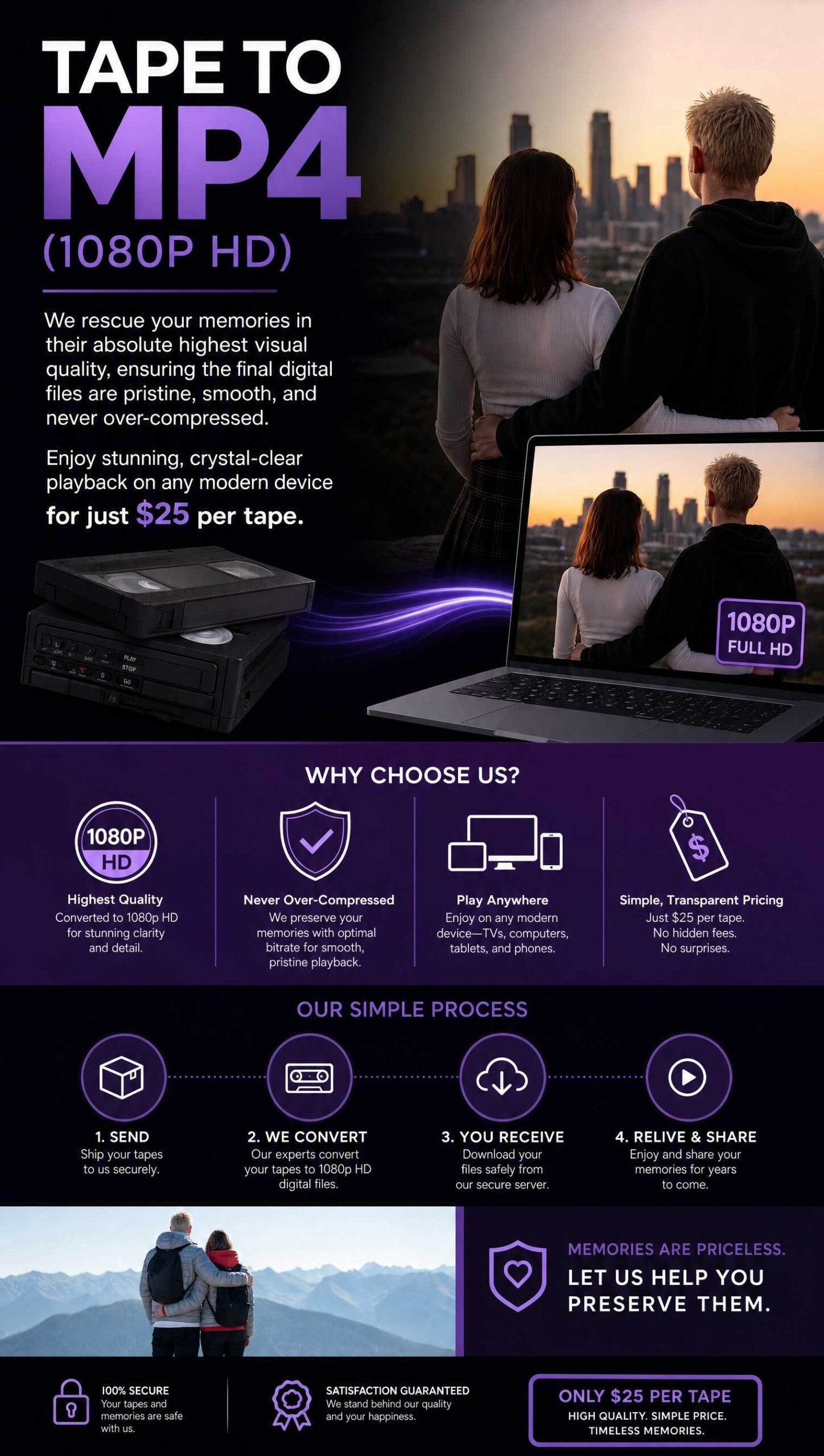
A modern, playable file from a tape that has not been touched in years.
This is the standard choice for viewing and sharing. AVS captures from professional playback decks, stabilizes the signal where appropriate, and delivers a 1440×1080, 59.94 fps H.264 MP4 file — deinterlaced and formatted for modern screens at the correct 4:3 aspect ratio, with no stretching and no cropping.
The visible detail is still governed by what the original tape recorded. Standard transfer includes professional playback, capture monitoring, signal handling, and deinterlacing. AI/ML upscaling, noise reduction, color correction, and stabilization are separate services quoted by scope.
- Best For: Family viewing, sharing with relatives, uploading to YouTube/Facebook, standard long-term storage.
- What You Get: MP4 files (H.264) — smooth deinterlaced playback for modern screens. Standard-definition 4:3 tape sources are delivered as 1440×1080 4:3 MP4 files — no black bars, no stretching.
- Motion Quality: Smooth deinterlaced playback eliminates stutter and interlacing lines.
- Compatibility: Plays on any device — iPhone, Android, Windows, Mac, Smart TVs, Roku, Apple TV, game consoles.
Technical Specifications
- Resolution: 1440×1080 (native 4:3 — no stretching, no black bars)
- Bitrate: 12 Mbps (high quality for dark scenes and fast motion)
- File Size: Approximately 10 GB per hour of video (H.265/HEVC by request at roughly 6–7 GB/hr)
- Editing: Suitable for basic trimming in iMovie, Premiere, or any standard editor
$25 per started 2-hour block
Each block covers up to 2 hours
Need to edit heavily? If you plan professional color grading, visual effects work, or aggressive post-production, consider our ProRes option below. MP4 compression is great for viewing but loses data during repeated re-encoding.
Frequently Asked Questions — MP4
What devices can play these MP4 files?
Any modern device: smartphones, tablets, computers, smart TVs, streaming sticks (Roku, Fire TV, Apple TV), and game consoles. MP4 is the most universally compatible video format available.
Can I upload these to YouTube, Facebook, or Instagram?
Yes. These files are optimized for social sharing and cloud storage. The modern MP4 format and high bitrate help your videos hold up well online while staying easy to download, stream, and share.
Will these work on my new 4K TV?
Absolutely. While the source is standard definition, our deinterlacing and 4:3 file preparation make tapes easier to watch on modern screens — no stretching, no interlacing lines, and no artificial widescreen distortion.
What's the difference between your MP4 and "budget" transfers?
Three critical factors: bitrate (12 Mbps helps prevent pixelation in dark and fast-moving scenes), deinterlacing quality (clean motion without combing lines), and capture quality (professional playback equipment and signal handling instead of consumer USB capture devices). Professional playback equipment, good deinterlacing, and an appropriate bitrate help the file hold up better on large modern screens.
How much storage do I need?
Plan for approximately 10 GB per hour of footage — roughly 20 GB for a full 2-hour tape. H.265/HEVC is available by request at roughly 6–7 GB/hr.
Can I edit these files later?
Yes, though MP4 uses lossy compression. For simple trimming or combining clips, MP4 works perfectly in iMovie, Premiere, or any basic editor. For extensive editing with multiple rounds of re-encoding, consider ProRes.
Do you enhance or restore the video?
Standard transfer includes professional playback, capture monitoring, signal handling, and deinterlacing. Restoration — noise reduction, color correction, AI upscaling, stabilization, or advanced repair — is a separate service quoted by scope.
Tape to ProRes (Editable Master)
The Professional Choice for Editing & Archiving
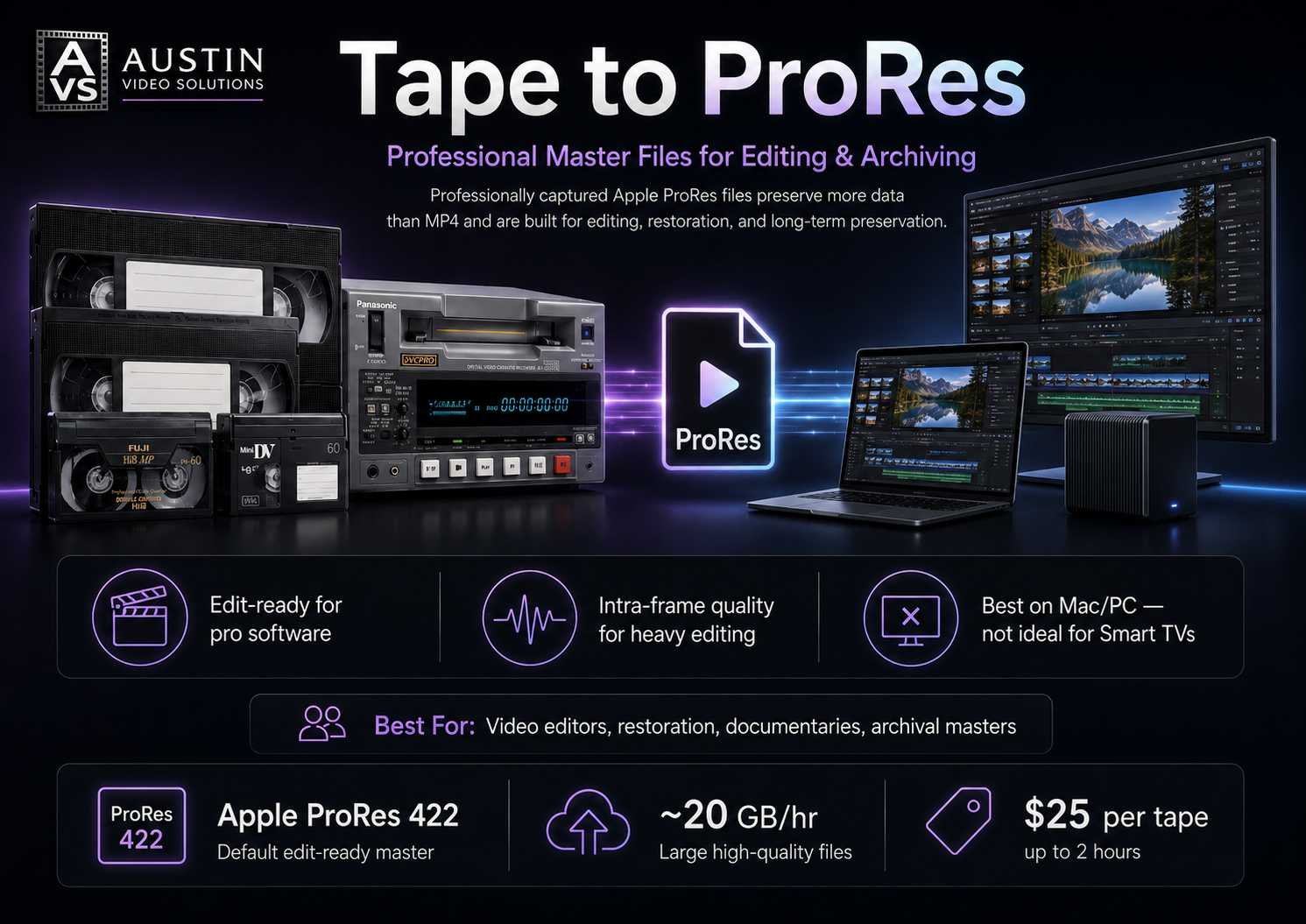
Industry-standard files for filmmakers, editors, and long-term preservation.
If you work in Final Cut Pro, Premiere, DaVinci Resolve, or Avid, start with the best possible source. We capture directly to Apple ProRes, preserving every field of data from your original tape without the heavy compression of MP4.
Think of ProRes as your "Digital Negative." It creates a master file that retains all the quality of the original tape, allowing you to generate any other format — MP4, DVD, web clips — later without quality loss.
- Best For: Video editors, documentary filmmakers, color grading, future-proof archival storage.
- What You Get: Edit-ready Apple ProRes 422 files (default).
- Quality: Intra-frame compression preserves detail during heavy editing — every frame is stored as a complete image.
- Compatibility: Best played on Mac/PC via VLC or professional editing software. Not recommended for direct Smart TV playback.
Technical Specifications
- Codec: Apple ProRes 422 — professional intermediate codec for editing and archiving
- File Size: Approximately 20 GB per hour of video
- Drive Requirement: Requires faster hard drives (USB 3.0+) due to large file sizes
- Other Codecs: ProRes 422 HQ, 4444, or Proxy available upon request
$25 per started 2-hour block
Each block covers up to 2 hours
Planning to watch on TV? ProRes files are too large and high-bitrate for most Smart TVs. If you want both an editing master and a viewing copy, add our MP4 option alongside ProRes.
Storage Planning Guide
ProRes files are massive by design — every frame is saved as a complete image, not compressed between frames. Use this chart to plan your drive space:
| Codec | Space per Hour | For 10 Tapes (20 hrs) | Best For |
|---|---|---|---|
| ProRes 4444 | ~58 GB | ~1 TB | Maximum color depth, VFX work |
| ProRes 422 HQ | ~28 GB | ~500 GB | Professional archiving, heavy restoration |
| ProRes 422 (Default) | ~19.5 GB | ~256 GB | Our recommended standard |
| DVCPRO50 / ProRes LT | ~13–27 GB | ~256 GB | High quality, smaller footprint |
| ProRes Proxy | ~6 GB | ~128 GB | Lightweight editing on older machines |
ProRes Codec Comparison
| Format | Bit Depth | Best For |
|---|---|---|
| ProRes 422 | 10-bit | Default choice — captures everything VHS/Hi8 can deliver |
| 422 HQ | 10-bit, higher bitrate | Archiving with headroom for aggressive color grading |
| 4444 | 12-bit + alpha | Professional restoration, VFX — overkill for most home tapes |
Drive Requirements
- Format: ExFAT, APFS, or NTFS only — FAT32 cannot handle files over 4 GB
- Connection: USB 3.0 or faster recommended for smooth playback
- Compatibility: Best played on Mac/PC via VLC or professional editing software. Not recommended for direct Smart TV playback.
Don't have a drive? Ask about drive options at drop-off — we'll recommend the right size and confirm pricing based on current availability.
Frequently Asked Questions — ProRes
What is ProRes, and do I actually need it?
ProRes is a professional "intermediate" codec used by studios for editing and archiving. Unlike MP4 (which compresses heavily for streaming), ProRes preserves every detail of your analog signal.
- Choose this if: You're editing a documentary, color-correcting footage, or want a future-proof master that can generate any format you need later.
- Skip this if: You just want to watch on your TV or share online — our MP4 service is simpler and smaller.
Why are these files 15–30× larger than MP4?
Standard MP4 uses "Long-GOP" compression — it guesses what's between frames to save space. ProRes is "Intra-frame," storing every frame as a complete image. This protects tape noise and grain from becoming digital artifacts during heavy editing.
Will ProRes files play on my TV or phone?
Macs and Windows PCs (via VLC) handle them fine. Smart TVs and phones typically don't — file sizes are too large and bitrates too high. If you need playback files alongside your ProRes masters, add our MP4 service.
What's the difference between 422, 422 HQ, and 4444?
ProRes 422 (10-bit) is our default — it captures everything VHS/Hi8 can deliver. 422 HQ offers a higher bitrate for aggressive color grading. 4444 is 12-bit with alpha channel support, designed for professional restoration and VFX — overkill for most home tapes.
Can I make MP4s from these later?
Yes. Think of ProRes as your original negative. Use free tools like Handbrake or Shutter Encoder to generate MP4s, clips for Instagram, or DVDs anytime — without digging out your tapes again.
Tape to Lossless (Uncompressed Master)
The Highest-Fidelity Analog-to-Digital Transfer Available
Bit-for-bit digital preservation with zero mathematical compression.
This service creates a true lossless digital master of your analog tape. Unlike MP4 or even ProRes, uncompressed capture retains every pixel and every bit of color information read from the magnetic signal. Nothing is estimated, averaged, or discarded.
We bypass standard consumer recording limitations to capture the full dynamic range of the tape using time-base correction (TBC) and enterprise capture hardware, ensuring 100% frame accuracy and eliminating signal jitter.
- Best For: Professional archivists, video editors requiring clean source files for VFX/green screen, legal/forensic video analysis, long-term digital asset management.
- The Result: A preservation master file in 10-bit Uncompressed YUV.
- Quality Assurance: TBC and enterprise capture hardware ensure 100% frame accuracy.
- File Integrity: Files are captured to high-speed enterprise storage and verified before transfer — zero data loss.
Who Needs Lossless?
This is a specialized service designed for:
- Institutions and archives that require preservation masters meeting national archival standards
- Production houses needing clean source files for broadcast restoration or VFX compositing
- Forensic and legal analysts who need unaltered source material
- Preservationists planning AI-assisted upscaling or future restoration work
For family home movies you plan to watch on a TV or computer, our ProRes or MP4 services are more practical and cost-effective.
Technical Specifications
- Capture Format: Uncompressed 8-bit or 10-bit 4:2:2
- Color Depth: Full dynamic range retention for advanced color grading
- Estimated File Size:
- 8-bit Uncompressed: ~72 GB per hour
- 10-bit Uncompressed: ~96 GB per hour
- A standard 2-hour tape may require nearly 200 GB of storage
$52.50 per started 2-hour block
Each block covers up to 2 hours
Drive Requirements
- Required Drive Format: ExFAT, APFS, or NTFS. FAT32 drives cannot accept files larger than 4 GB — your transfer will fail.
- Connection Speed: USB 3.0 or 3.1 highly recommended. Slower connections may struggle to write the massive data stream.
- Our Workflow: We capture to high-speed internal storage first to guarantee stability, then perform a verified copy to your provided external drive.
Frequently Asked Questions — Lossless
What is the benefit of uncompressed video?
Most digital formats (like MP4 or H.264) shrink file sizes by removing visual data you "might not notice." Uncompressed video retains every pixel and bit of color information read from the tape. This is essential if you plan to edit the footage, remove noise, or upscale the resolution later.
Is this the same as "archival quality"?
Yes. Institutions like the National Archives and major libraries require uncompressed masters because they are future-proof. By keeping a lossless preservation master, you ensure that future restoration technologies (like AI enhancement) have the cleanest possible data to work with.
Do I need this for family home movies?
For simple viewing on a TV or computer, our ProRes or HD MP4 services are more practical and cost-effective. Choose Lossless only if you are a video editor, archivist, or planning heavy restoration work on the footage.
What is the difference between 8-bit and 10-bit?
- 8-bit: Matches the standard color depth of most analog tapes.
- 10-bit: Captures smoother transitions between colors and shadows. This provides more headroom for professional color grading without introducing banding or artifacts.
Why can't I use a standard USB thumb drive?
A single 2-hour tape can generate nearly 200 GB of data. Most thumb drives lack both the capacity and the write speed to handle this data stream safely. Using a slow drive can lead to file corruption. We recommend a dedicated external SSD or HDD.
How do I play these files?
These are data masters first and viewing files second. You can play them using VLC Media Player, DaVinci Resolve, or Adobe Premiere. Because the data rate is extremely high, older computers may experience stuttering during playback.
Tape to DVD (Physical Disc)
The Classic Choice for TV Playback
Play your memories directly on your TV — no computer, no cloud, no apps.
We transfer your analog tapes to standard-definition DVD-Video for playback on compatible disc players. The DVD transfer rates below cover this service. Custom Blu-ray authoring is a separate production service with its own quote.
- Best For: Living room viewing, gifts for relatives, backup copies for family members who prefer physical media.
- What You Get: Physical DVD discs labeled with your content details.
- Compatibility: Intended for DVD-Video-compatible players. Computer playback requires a DVD drive and suitable software; confirm your player model if you are unsure.
- Resolution: Standard-definition DVD-Video. Final quality depends on the source tape and transfer.
Technical Specifications
- Format: DVD-Video (Region Free)
- Navigation: Chapter marks included for easy skipping
- Capacity: Up to 2 hours of video per single-layer DVD
- Editing: This is a final playback copy; keep a digital master if you plan to edit later.
Choose Your DVD Style
Standard DVD Transfer
$17.99 per tape
Up to 2 hours
Simple, reliable, and ready to watch. Your video is transferred to disc with automatic chapter breaks every 5–10 minutes. You can skip forward by chapter, but there is no visual menu screen. Ideal for cost-effective archiving and straightforward linear viewing.
Custom Menu DVD
$22.99 per tape
Up to 2 hours
Professional navigation with scene selection. We create a custom interactive menu with thumbnail images so viewers can jump to specific scenes. Ideal for gifts, presentations, or tapes with multiple distinct events (birthday, graduation, vacation).
Need an authored Blu-ray?
Custom Blu-ray authoring includes agreed menu design, animated scene selection, title and chapter navigation, encoding, master output and playback checks. It is quoted by project and by the number of unique authored volumes. DVD transfer prices and the $18 data-backup add-on do not cover this work.
Frequently Asked Questions — DVD
Will these DVDs play on my Blu-Ray player?
Many Blu-ray players also support DVD-Video. Playback depends on the specific model and its support for recordable DVDs. Bring or send the player model so we can confirm the intended format.
Can I edit the video on the DVD later?
DVD-Video is a final playback format. If you may want to edit, trim or restore the footage later, request MP4 or ProRes files alongside the DVD so you retain a more practical editing source.
What is the video quality?
DVD-Video is standard definition. It does not deliver an HD Blu-ray presentation. The source recording and transfer determine how much detail can be preserved; converting a tape does not create detail that was never recorded.
Can I get both digital files and a DVD?
Yes. A DVD playback copy can be added to completed AVS tape-digitization work for $12 per transferred tape. That delivery add-on is separate from the $17.99 or $22.99 tape-to-DVD transfer service. See Delivery Add-Ons for the different disc options.
How long do the DVDs last?
Disc life depends on the media, handling and storage. Keep discs clean and protected from heat and scratches, and retain a separate copy of your digital files rather than relying on one physical disc.
8mm & Super 8 Film Scanning
Frame-by-Frame 2K Film Scanning
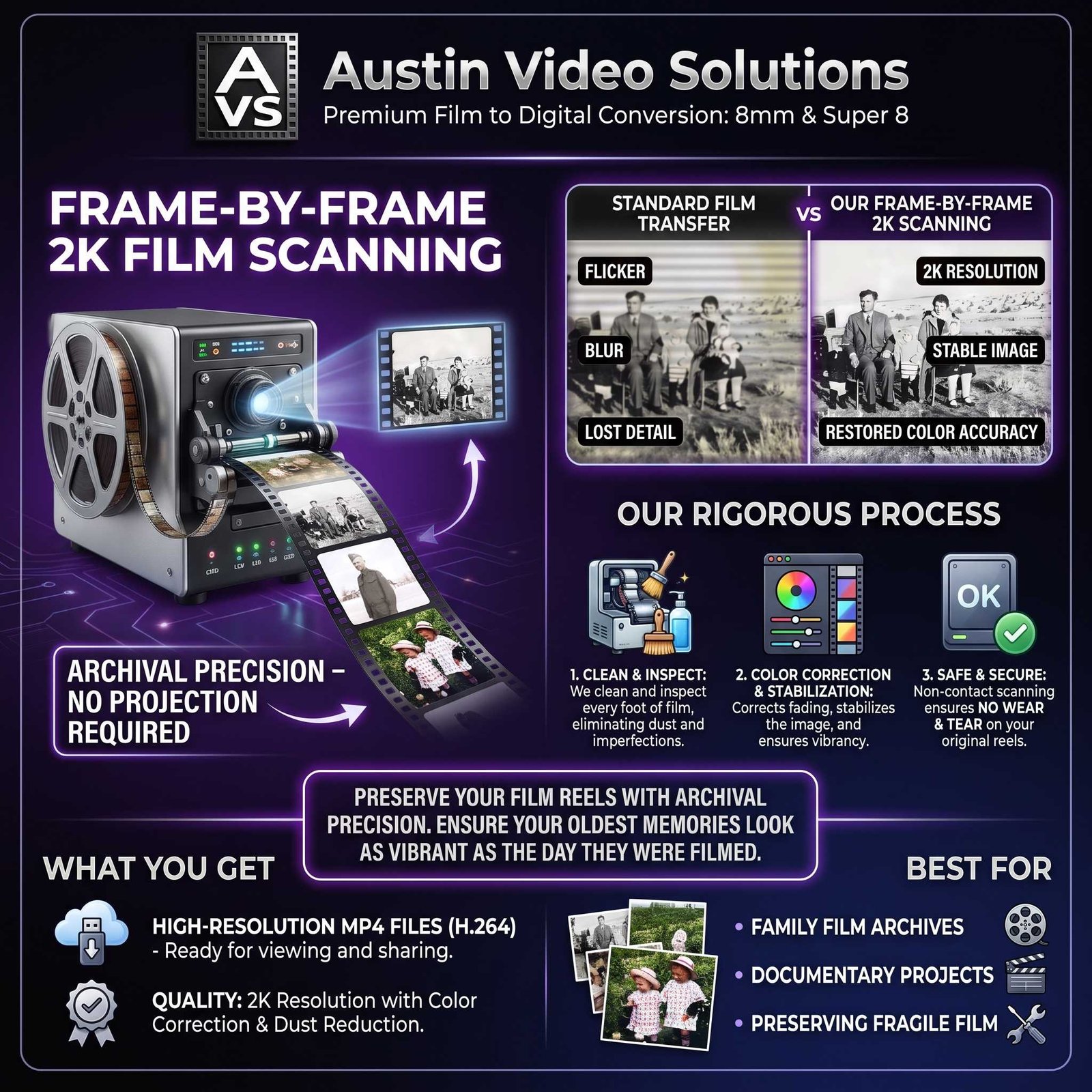
Preserve your film reels with archival precision — no projection required.
Standard film transfers use a camera to record a projector, resulting in flicker, blur, and lost detail. Our frame-by-frame scanning captures each individual frame at 2K resolution. This eliminates flicker, stabilizes the image, and restores color accuracy without risking damage to your fragile originals.
We clean and inspect every foot of film before scanning. Our process corrects color fading and stabilizes the image, ensuring your oldest memories look as vibrant as the day they were filmed.
- Best For: Family film archives, documentary projects, preserving fragile film that cannot be projected.
- What You Get: High-resolution MP4 files (H.264) ready for viewing and sharing.
- Quality: 2K resolution (1920×1440) with color correction and dust reduction.
- Safety: Non-contact scanning ensures no wear and tear on your original reels.
Technical Specifications
- Formats: 8mm, Super 8, and Standard 8
- Resolution: 2K High Definition
- Processing: Frame-by-frame capture, color balance, and stabilization
- Delivery: Digital files delivered via Cloud, Hard Drive, or Disc (see Delivery Options)
$0.49 per foot
Example: A standard 50ft reel ≈ $24.50
Photo, Slide & Negative Scanning
Hand-Scanned Photo Digitization
Every image handled individually — no auto-feeders, no scratches, no shortcuts.
Automated bulk scanners can scratch fragile photos and miss crucial details. We hand-scan every individual photograph, slide, and negative to ensure brilliant, dust-free digital images. Whether you have shoeboxes of prints or trays of slides, each item gets archival care.
- Best For: Family photo albums, slide collections, negatives, creating backup copies of irreplaceable prints.
- What You Get: High-quality JPEG, TIFF, or PNG files.
- Quality: High-resolution scanning at 600 DPI (higher upon request).
- Safety: Hand-placed scanning eliminates the risk of jams or scratches from automated feeders.
Technical Specifications
- Media Types: Prints (any size), 35mm Slides, Negatives (35mm, 120, 4×5)
- Output Formats: JPEG (standard), TIFF (archival), or PNG
- Processing: Dust removal, color correction, and optional upscaling
- Delivery: Digital files delivered via Cloud, Hard Drive, or Disc (see Delivery Options)
$0.49 per image
Example: 100 photos ≈ $49.00 · Bulk pricing available for 100+ images
Frequently Asked Questions — Film & Photo Scanning
Will scanning damage my old film or photos?
No. Our frame-by-frame film scanning is non-contact — nothing touches the film surface. Photo scanning is done by hand, avoiding the abrasive rollers found in bulk automated scanners.
What resolution do I get?
- Film: 2K resolution, which captures all the detail present in 8mm and Super 8 film without creating unnecessarily massive files.
- Photos: Scanned at resolution high enough for reprinting (typically 600 DPI). If you need higher resolution for large prints, ask about our Archival TIFF option.
Can you fix scratched or faded media?
Yes. Our service includes basic color correction and dust removal. For heavily damaged film or torn photos, we offer restoration add-ons that can repair scratches, stabilize shrinkage, and reconstruct missing details.
How do I receive my files?
Choose Cloud Delivery for instant sharing, a Hard Drive for permanent storage, or a Data Disc. See Delivery Options for details.
Do you return the originals?
Absolutely. Your original film reels, photos, and negatives are returned to you safely packaged alongside your new digital files.
Audio Cassette Digitization
Clean Digital Transfers From Tape
Cassette tape binders degrade over time. A 30-year-old recording is not guaranteed to survive another decade on the shelf, and once the binder fails, the audio is gone. A clean digital transfer preserves what is there now before that window closes.
Both sides of every cassette are included in the standard transfer. Basic hiss reduction and level balancing are standard. Advanced restoration — significant noise removal, dropout repair, track splitting, or custom naming — is quoted separately by scope.
- Best For: Music recordings, personal journals, interviews, demo tapes, and family voice recordings.
- What You Get: WAV or MP3 files. Both sides included.
- Active Formats: Audio cassette, microcassette, and MiniDisc.
Starting at $39.99 per cassette
Both sides included · advanced restoration quoted separately
Video Editing & Production
From Raw Footage to Finished Story
Don't just digitize your memories — bring them to life.
Our custom editing service transforms your digitized tapes, photos, and film into polished videos tailored for your specific occasion. We handle clip selection, music, titles, transitions, and pacing so you get a finished product ready to share.
- Memorial Tributes: Tasteful pacing, readable titles, respectful music selection.
- Event Recaps: Weddings, birthdays, graduations, family reunions.
- Business Content: Promos, testimonials, archival footage for commercial use.
- Custom Slideshows: Photo animations with professional transitions and sound design.
Collaboration: Work with us remotely or in-studio to ensure the final cut matches your vision. Includes color correction, audio balancing, and AI upscaling for old photos when needed.
Custom Quote
Based on project scope and length
Custom Blu-ray Authoring
Turn finished videos into a Blu-ray presentation with custom menus, animated scene selectors and chapter navigation. Source review, encoding, menu work, master output and playback checks are quoted for the actual collection. Each unique authored volume requires production work; additional identical copies are priced separately.
The agreed deliverable is an authored master disc or ISO, with clear disc identification where a physical master is supplied. Custom case artwork and illustrated disc printing are not included.
Delivery Add-Ons
Choose How You Receive Your Files

Your tapes are digitized. Now pick the delivery method that fits your setup.
☁️ Cloud Delivery (Stream & Share)
Best for: Sharing with family instantly and watching on Smart TVs without a computer.
Get a secure, private link to your videos. No software installation required.
- Watch Anywhere: Stream directly on iPhone, Android, PC, or Mac.
- Smart TV Ready: Use the Dropbox app on AppleTV, Roku, or FireTV to watch on your living room television.
- Easy Download: Move files to your own Google Drive, iCloud, or computer with a single click.
- Security: Your gallery is password-protected and private.
- Access Period: Files remain available for download for 180 days.
$5.00 per delivered video file
💾 Physical Hard Drive
Best for: Long-term storage, editing, and keeping a digital master in your safe.
You can purchase a new drive from us or bring your own.
Storage estimates below are approximate and depend on final codec choices. If you selected ProRes or Lossless, you will need significantly more space.
Purchase a New Drive
You may bring your own blank compatible drive at no additional storage-media cost. If you need AVS to provide a drive, we'll recommend the right size, confirm the current retail price with you, and add the actual drive cost to your invoice. Drive prices fluctuate, so we confirm pricing at drop-off rather than publishing a fixed table.
| Drive Size | Estimated Capacity (MP4) | Price | Type |
|---|---|---|---|
| 64 GB | ~10 Hours (5 Tapes) | Current retail | USB 3.0 Thumb Drive |
| 128 GB | ~21 Hours (10 Tapes) | Current retail | USB 3.0 Thumb Drive |
| 256 GB | ~42 Hours (20 Tapes) | Current retail | USB 3.0 Thumb Drive |
| 500 GB | ~83 Hours (40 Tapes) | Current retail | Portable External HDD |
| 1 TB | ~166 Hours (80 Tapes) | Current retail | Portable External HDD |
| 2 TB | ~332 Hours (160 Tapes) | Current retail | Portable External HDD |
🔌 Bring Your Own Drive — Free
Already have a hard drive? Bring it in and we'll load your files at no charge.
- ⚠️ Required: Your drive must be completely blank (formatted). This prevents virus transmission, ensures file integrity, and eliminates the risk of accidentally overwriting your existing data.
- Space Planning: MP4 format requires ~5.5 GB per hour. ProRes/Lossless requires ~72–100 GB per hour.
- Connection: USB 3.0 drive recommended for fastest transfer speeds.
Pro Tip — The 3-2-1 Rule: Digital preservation best practice is to keep 3 copies of your files, on 2 different types of media, with 1 stored off-site. For ultimate peace of mind, order two drives — one for home viewing, one for a fireproof safe or safety deposit box.
DVD Playback Copy — $12 per Transferred Tape
An optional standard-definition DVD playback copy for an existing AVS tape-digitization job. The original transfer is billed separately. This is intended for compatible DVD-Video players; it is separate from our full tape-to-DVD transfer service and from custom Blu-ray authoring.
Blu-ray Data Backup — $18 per Transferred Tape
We copy the finished MP4 files from your existing AVS tape-digitization job onto a Blu-ray as data files, much like copying them to an external hard drive. The files retain their existing format and resolution. Access requires a compatible computer Blu-ray drive and software.
This $18 add-on does not include authoring, menus, chapter navigation or an authored Blu-ray movie for a living-room player. It does not include the original digitization or a new custom production project.
Custom Blu-ray Authoring — Project Quote
For a player-ready presentation with menus, animated scene selection and chapter navigation, request custom Blu-ray authoring. The quote reflects runtime, source preparation, menu complexity, unique volumes, testing and the agreed master deliverable. Duplicate copies are quoted separately. Film and photo disc-delivery costs are confirmed with those jobs.
Delivery Add-On Summary
| Delivery Method | Best Use Case | Price |
|---|---|---|
| Cloud Link | Instant sharing & Smart TV streaming | $5.00 / delivered video file |
| New Hard Drive | Permanent storage & large orders | Price confirmed at drop-off |
| Your Own Drive | Cost-saving (if you have hardware) | Free |
| DVD Playback Add-On | SD playback copy of an existing tape-digitization job | $12.00 / tape |
| Blu-ray Data Backup | Finished MP4 files stored as data; no authoring | $18.00 / tape |
| Custom Blu-ray Authoring | Menus, animated scene selection and an authored master | Project quote |
Supported Formats
We handle consumer, professional, and legacy media.
📼 Video Tapes
- VHS
- VHS-C
- Hi8
- Digital8
- Betamax
- Betacam SP
- U-matic
- MiniDV
- HDV
- MicroDV
- DVCPRO
🎞️ Film & Photos
- 8mm Film
- Super 8 Film
- Standard 8 Film
- 35mm Slides
- Negatives (35mm, 120, 4×5)
- Prints & Photo Albums
🎵 Audio
- Cassette Tapes
- Microcassettes
- MiniDisc
Don't see your format? Contact us — we likely handle it.
The Austin Video Solutions Process
What to Expect When You Work With Us
Consultation & Drop-Off
We're located in South Austin (78748). Most clients prefer to drop their media off in person. We review your collection together, identify formats (VHS, Hi8, Film, etc.), and discuss your goals — whether it's a simple viewing copy or a professional restoration. Your media is logged, labeled, and stored securely in-house. It never leaves our facility.
Precision Capture & Digitization
Your tapes are played on serviced, professional-grade decks (Sony, Panasonic, Blackmagic) for gentle handling and optimal signal retrieval. We capture a high-bitrate, 10-bit signal to enterprise-grade storage — 100% frame accuracy with natural motion preserved. Every foot of film and tape is inspected for damage before capture.
Review & Delivery
Once your project is digitized, we verify every file before delivery. If you chose Cloud Delivery, you'll receive a private link to stream and review immediately. For hard drive delivery, we perform a verified transfer and check every file plays correctly before you leave. Your original tapes, photos, and film are returned safely packaged alongside your new digital files.
Frequently Asked Questions — General Pricing
How much does VHS to digital cost?
Our standard Tape to MP4 service is $25 per started 2-hour block (up to 2 hours). ProRes masters are also $25 per started 2-hour block. Lossless archival transfers are $52.50 per started 2-hour block. Film scanning is $0.49 per foot, and photo scanning is $0.49 per image. These standard transfer rates have no setup fees or minimums. Custom editing and Blu-ray authoring are quoted separately for the agreed scope.
Are there any hidden fees or minimum orders?
Standard transfer services have no setup fees or minimum order. Delivery add-ons and storage media are separate where listed. Custom editing and Blu-ray authoring receive a project quote, including any agreed setup or production work, before we begin.
What if my tape is longer than 2 hours?
MP4 and ProRes transfers are $25 per started 2-hour block: 0–2 hours is $25, over 2–4 hours is $50, and over 4–6 hours is $75. DVD transfer prices include up to 2 hours; longer DVD projects are confirmed separately. Custom Blu-ray runtime and disc count are reviewed as part of the authoring quote.
Do I pay upfront?
No — you do not pay when booking. We inspect your media, confirm the best output option, complete the work, then send a PayPal Business invoice payable by card, PayPal, Venmo, or e-check before final files, discs, or cloud delivery are released. Special orders, purchased drives, unusually large projects, rush work, custom editing or custom Blu-ray authoring may require a deposit.
Which format should I choose?
- MP4 if you want to watch on TVs, phones, and computers, or share with family.
- ProRes if you plan to edit the footage professionally or want a future-proof master.
- Lossless if you're an archivist, institution, or professional planning heavy restoration.
- DVD if you want a physical disc for simple TV playback with no tech involved.
Not sure? We'll help you decide during your consultation — no pressure.
Can I combine services?
Absolutely. Many customers order MP4 for viewing plus ProRes for archival, or digital files plus a DVD for a relative. We'll build a package that matches your needs.
Ready to Get Started?
Questions? The chatbot in the bottom-right corner is available 24/7 — or call/text Austin Video Solutions directly.
📍 South Austin, TX 78748 — By Appointment Only · Monday through Sunday, 8 AM – 5 PM