Austin Video Solutions · South Austin, TX · By Appointment
VHS to DVD Transfer in Austin — Just Press Play
No apps. No streaming. No passwords.
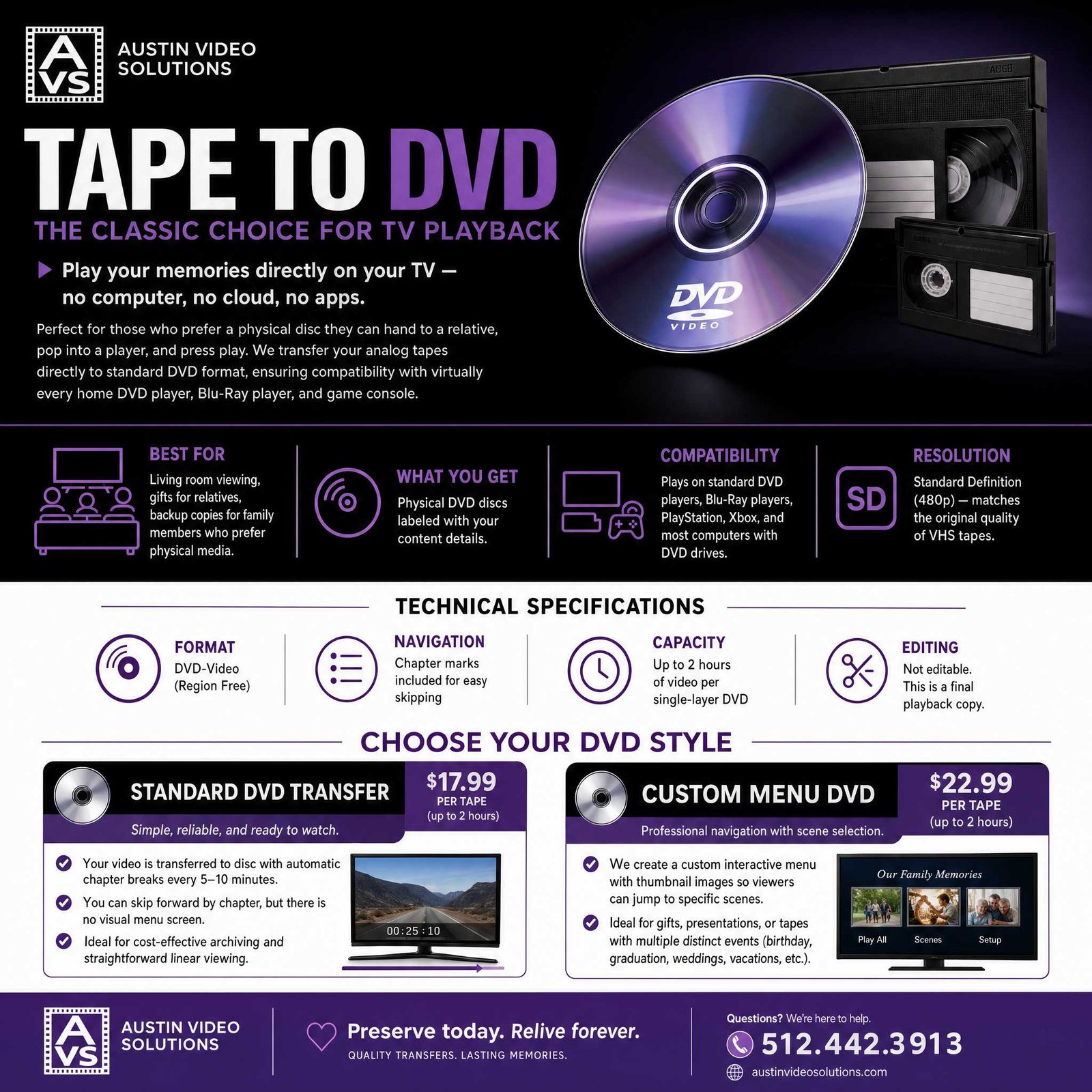
Convert your VHS, Hi8, MiniDV, and camcorder tapes to DVD at our private South Austin studio. Pop it in any DVD player and watch. Starting at $17.99 per tape.
Basic DVD
Enhanced DVD
Why People in Austin Still Choose VHS to DVD Transfer
Looking for a simple way to convert your old videotapes to DVD in Austin? Digital files work well if you're comfortable with cloud storage, USB drives, and streaming apps. Not everyone is — and not everyone wants to be. Some people just want to hand a disc to their parents and say "put this in the DVD player."
VHS to DVD transfer remains one of AVS's most-requested services because DVDs are simple, physical, easy to gift, and familiar for people who still prefer disc playback.
Plays in any DVD player, laptop, PlayStation, or Xbox
No Wi-Fi, no accounts, no software updates
Hand someone a physical disc with a label. It feels real.
Our most budget-friendly transfer option
If you also want digital files to share or edit, we can do both. If a disc is all you need, that works.
Two DVD Options. Pick What Fits.
Basic vs. Enhanced — Side by Side
| Feature | Basic ($17.99) | Enhanced ($22.99) |
|---|---|---|
| Tape-to-DVD transfer | ✅ | ✅ |
| Auto chapter breaks | ✅ | ✅ |
| Interactive thumbnail menu | — | ✅ |
| Scene selection with previews | — | ✅ |
| Color correction / restoration | By quote | By quote |
| Audio cleanup | By quote | By quote |
| Professional disc label | — | ✅ |
Need Something More Custom?
For weddings, memorials, anniversaries, and corporate presentations, we build fully custom DVDs with:
- Multi-layer animated menus
- Intro sequences and background music
- Personalized graphics and text overlays
- Multiple videos compiled onto one disc
- Custom case insert artwork
Custom DVDs are part of our video editing services and are quoted per project.
What Tape Formats Can Go to DVD?
📼 VHS / VHS-C
The most common format we see. Full-size VHS and compact VHS-C cassettes. Both transfer perfectly to DVD.
📹 Hi8 / Video8 / Digital8
Sony's camcorder family from the late '80s through 2000s. We have professional playback decks for all three.
🎥 MiniDV / DVCAM / HDV
Small digital camcorder tapes popular from the mid-1990s through the 2000s. Already digital on tape, so the transfer can be very clean when the tape is playable.
📦 Betamax
Sony's home video format from the early '80s. Less common, but we have the decks.
🔧 Other Formats
If you have an unusual or professional-format tape, text us a photo before booking. We'll confirm what we can handle before you make the trip.
❓ Not Sure?
Text us a photo of your tape at (512) 518-3188 and we'll identify it for you.
How DVD Transfer Works
Drop Off
Book an appointment and bring your tapes. We confirm formats, tape count, and whether you want Basic or Enhanced. You get a quote before we start.
Transfer
Each tape is played on a professional deck with time-base correction or signal stabilization where appropriate, captured digitally, then authored to DVD with your chosen menu style.
Pick Up
We text you when it's done (usually 1–3 days). Pick up your DVDs and original tapes. Done.
DVD Transfer Questions
How many tapes fit on one DVD?
One tape per DVD is standard. DVDs hold about 2 hours of video at full quality. For shorter tapes, we can combine multiple onto one disc — just ask at drop-off.
Will my DVD work in my car, laptop, or old player?
Yes. We author standard DVD-Video format, which plays in virtually every DVD player manufactured in the last 25 years, plus computers and game consoles.
Can I make copies of the DVD?
Your DVDs are not copy-protected. You own them. Copy freely for family members using any computer with a disc drive.
How long does VHS to DVD take?
Most DVD transfers are completed in 1–3 business days. Larger collections are confirmed at drop-off.
What's the difference between VHS to DVD and VHS to MP4?
DVD gives you a physical disc you can play in a DVD player. MP4 gives you a digital file you can play on a phone, Smart TV, computer, or share online. Many clients get both: one disc for the living room and one file for sharing or editing.
Will my DVD work in my laptop?
Yes, if the laptop has a disc drive or you use an external USB DVD reader. The disc is authored as standard DVD-Video.
What about Blu-ray?
Blu-ray and data-disc options can be discussed at drop-off. Data Blu-ray works like an archive disc for digital files; playable Blu-ray authoring is different from standard DVD transfer and should be quoted based on the project.
What if my tape is longer than 2 hours?
DVD transfer pricing includes up to 2 hours of content. Longer tapes may require additional DVD blocks, additional discs, or custom handling. AVS will confirm the total before work begins.
Ready to Put Your Tapes on DVD?
Book a drop-off appointment and have your DVDs in hand within days. We'll handle the transfer — you just bring the tapes. Questions first? Use the chatbot in the bottom-right corner, or call/text Austin Video Solutions directly.
📍 South Austin, TX 78748 — By Appointment Only
Tape to MP4 ·
Full Pricing ·
Video Editing ·
Our Services ·
Reviews ·
FAQ ·
How to Get Started